EXPLORE THE INTERFACE
Every Control, Explained
From libraries and smart search to the piano roll, scale keyboard, and playback controls — here is the full MIDI Xplorer workspace at a glance.
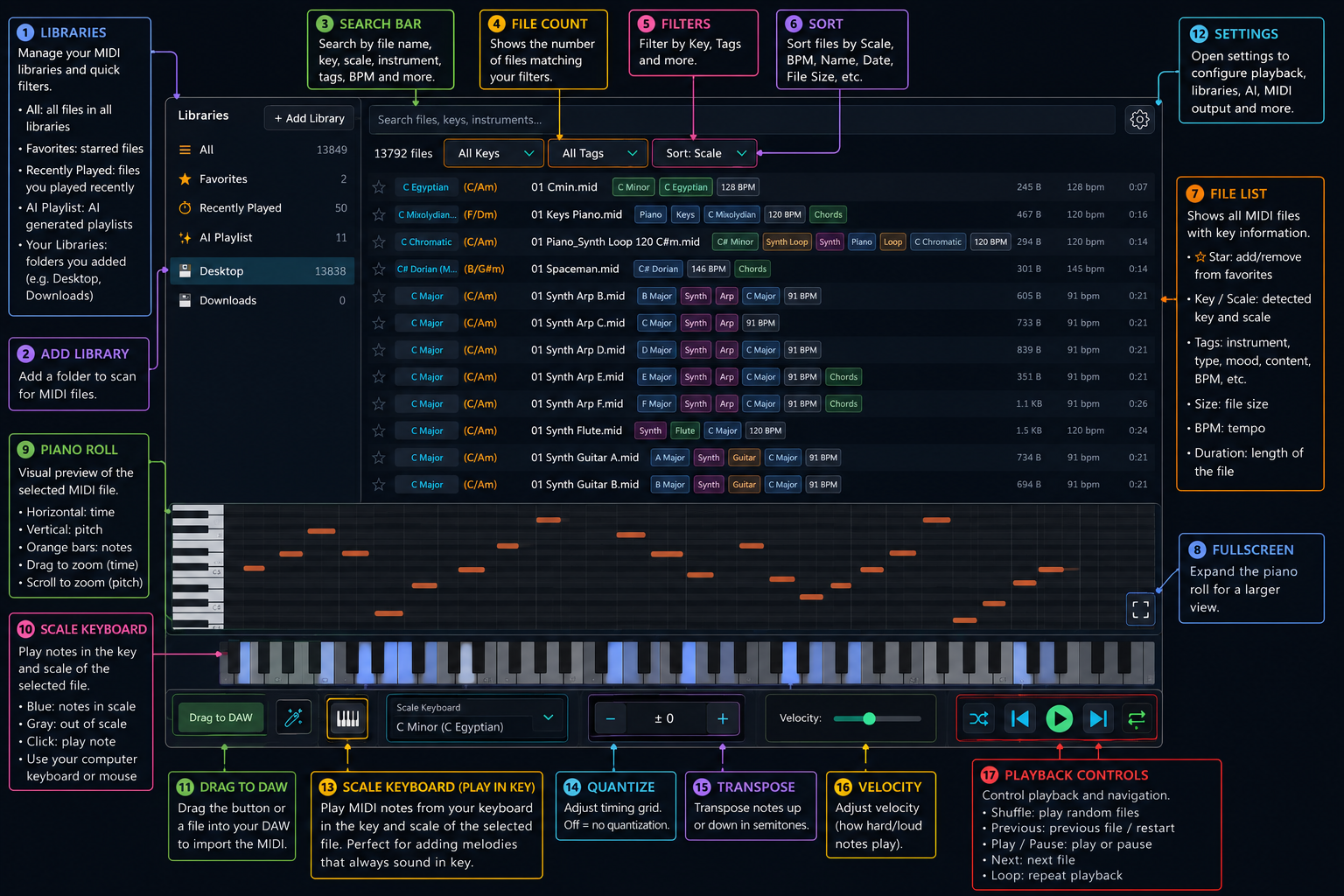
MACOS MIDI BROWSER • ANALYZER • PLAY-IN-KEY SCALE KEYBOARD
MIDI Xplorer scans MIDI folders and turns them into searchable musical libraries with detected key, scale, chords, tags, BPM, instruments, piano-roll preview, quick transforms, DAW drag-and-drop, and a play-in-key scale keyboard.
EXPLORE THE INTERFACE
From libraries and smart search to the piano roll, scale keyboard, and playback controls — here is the full MIDI Xplorer workspace at a glance.
SEE IT IN ACTION
See how fast a raw folder of MIDI files becomes searchable, playable, transformable, and DAW-ready.
SEARCH, ANALYZE, PREVIEW, CREATE
MIDI Xplorer is built for producers, composers, and MIDI library power users who need musical metadata, fast preview, reliable DAW import, and a play-in-key scale keyboard in one macOS tool.
Add custom MIDI folders, scan recursively in the background, pause or refresh libraries, and relaunch faster with a persistent file cache.
Search and filter by file name, detected key, scale type, extracted tags, BPM, duration, instrument type, genre-style hints, or mood.
Detect key, scale, confidence, chords, single-note files, BPM, duration, note range, tracks, timing, events, and filename metadata.
Play, pause, seek, shuffle, repeat, zoom, pan, inspect hovered notes, highlight active notes, and view chords while browsing.
Transpose, scale velocity, quantize, add swing, use tuplets or mixed grids, and reset transforms without damaging the original MIDI.
Play a scale keyboard locked to the selected MIDI file's scale or a live audio input. Use chord mode for scale-based chords or single note mode to play the notes in key, with a bundled instrument library to experiment with.
BUILT FOR MIDI POWER USERS
MIDI Xplorer combines library management, musical analysis, playback, transformation, DAW handoff, and a play-in-key scale keyboard without forcing every feature into your first session.
HOW IT WORKS
Point MIDI Xplorer at local or external folders. It recursively scans standard MIDI files, analyzes them in the background, and keeps your library state persistent.
Filter by key, scale, tags, BPM, duration, instrument, mood, and sort order so a huge folder behaves like a musical database.
Use the piano roll, transport, seek, zoom, transpose, velocity scaling, quantize, swing, and tuplets to test the idea before export.
Drag MIDI into your DAW or Finder, use host transport sync in plugin mode, or play the scale keyboard in key on top of the selected MIDI file or a live audio input.
ANALYZE, TRANSFORM, PLAY
MIDI Xplorer works as a native macOS standalone app and as a DAW MIDI utility before virtual instruments. Use it to inspect, preview, reshape, export, or play in key on top of your MIDI files and audio input while keeping the original file library intact.

INCLUDED WITH MIDI XPLORER
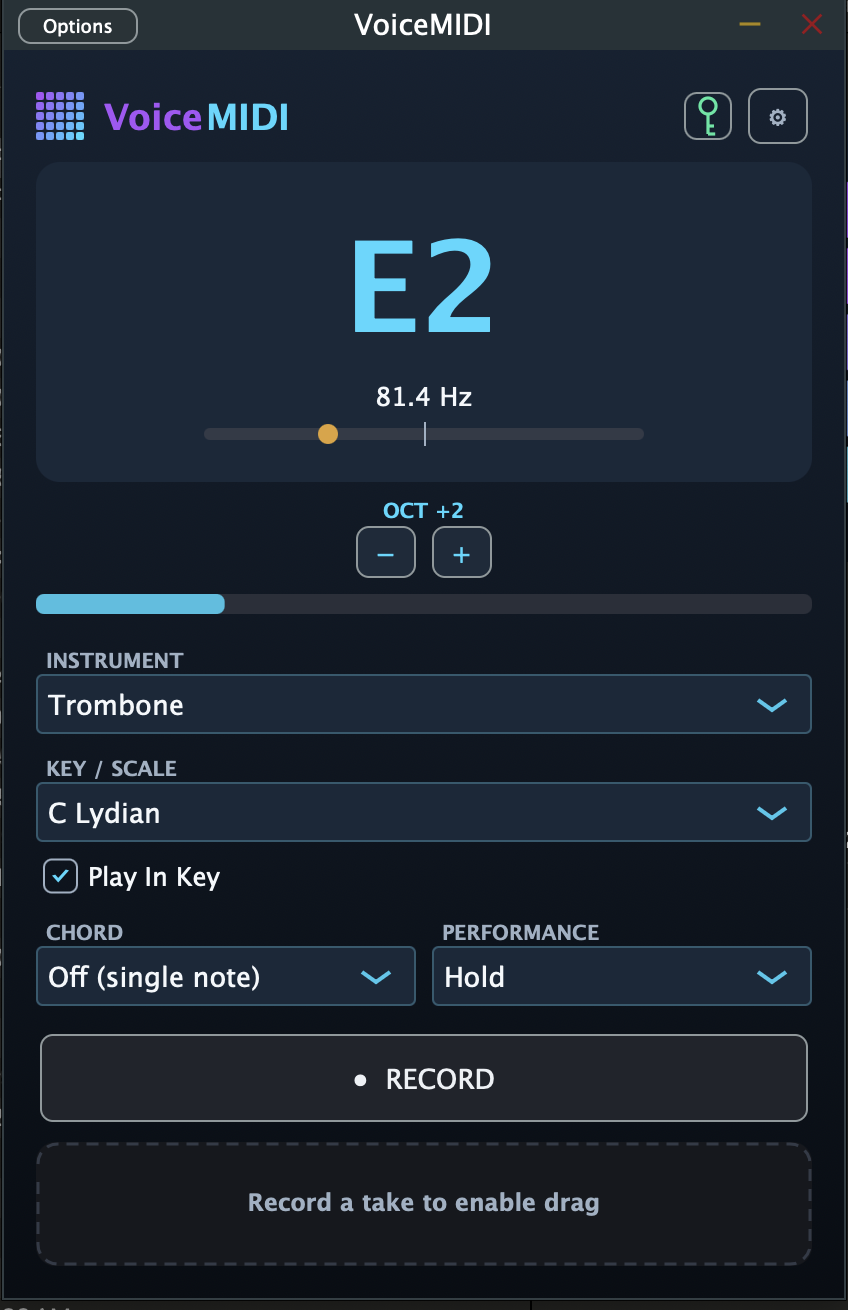
VoiceMIDI turns singing or humming into playable MIDI notes and chords, then syncs with MIDI Xplorer so your voice follows the selected key and scale inside Logic Pro, Ableton, or your DAW.

WORKS WITH YOUR SETUP
Use MIDI Xplorer as a standalone macOS app, a VST3 MIDI effect, an Audio Unit plugin, or an optional legacy VST2 build when a valid VST2 SDK is provided. The MIDI Xplorer FX version lets you preview MIDI files through any local VST instrument.
Built-in preview instrument and device settings
Works before virtual instruments in your DAW
Preview MIDI files through any local VST instrument
TRY IT FIRST
Download MIDI Xplorer, scan your own MIDI library, preview and transform ideas in context, play the scale keyboard in key on top of your files and audio input, and drag files into a real project before deciding anything.
The best proof is inside your session. Install it, open it standalone or in your DAW, and see whether analysis, piano-roll preview, transforms, drag-and-drop, and playing in key on top of your MIDI actually speed you up.
Pricing stays on its own page for when you are ready to upgrade.